Showing posts with label curriculum. Show all posts

Tuesday, January 29, 2013

Starting Kindergarten on the iPad

See more on Artsonia.

Where do I begin for my Kindergarten students?  This is the question I was asking myself when thinking about how to incorporate the iPad into my K curriculum.  I came across the app My Flake and decided it was a simple idea with excellent results so I'd start there.  Students had just finished drawing themselves on a snow day, so it fit with the idea and I could display them together.  The first day, I had students work on their snow day portraits and called ten students to the carpet to work since I have ten iPads (ten of which I'm very grateful for!).  I thought I could run it like a centers in their regular Kindergarten class.  I didn't like this set up, however.  I didn't like that I couldn't help students who were drawing and was stuck on the carpet.  The students at the carpet weren't helping each other because they were consumed with their own iPad and were very needy with me sitting right there.

Today was attempt two.  I decided each table (I have ten, conveniently) would get an iPad and they would just watch each other work.  I felt this worked better.  Students helped other students.  (Some have them at home, others do not, so they teach each other the basics like how to use the home button.  Which saves me time since I only have K once a week for 40 minutes!)  I was able to help all my students.  Everyone was focused on the same goal.  Students were excited to see their peers' results and gave one another positive feedback.  Kids and I were happier.
I used Skitch to write the
name on each snowflake.

As they finished their snowflakes, I took a screenshot of the snowflake and then I opened the photo in Skitch. I prepared the text box for each student and they typed their own name and saved it.  Extra keyboarding practice was a bonus!  I was very busy with this task and 23 kids, but as the class went on, students learned the process by watching and it went faster.  I cropped the snowflakes after class.  Each iPad uses the same Skitch/Evernote account, so I could crop them all on one iPad because they automatically sync together.

When I first choose this app, I was conflicted if it really went with my curriculum.  I'm not one for fluff or pretty things if students aren't making meaning.  Was it teaching them anything other than just how to use and share the iPads and a really cool app?  As they were working today, I realized they were using shapes and lines, and then turning those into a snowflake.  It put meaning to their random choices, gave them a chance to play, and started Kindergarten students on their journey of using iPads in the art room.

Friday, January 25, 2013

All in One for Digital Photography

Today fourth grade students rocked out a digital photography lesson!  I am very excited about the process and results.

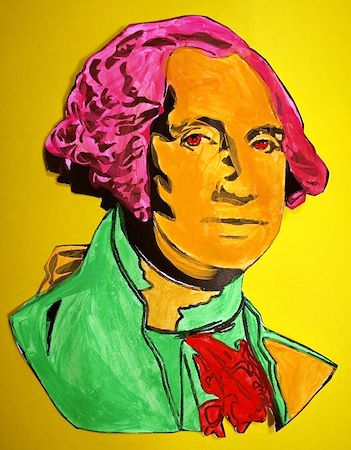
We started our journey into pop art by painting simple drawings of presidents found on Crayola's website.  Students used three to four fluorescent paints. (I am really impressed with Crayola's Premier Tempera! I think the extra few dollars is worth it for the fluorescent colors.)  I'll publish the results of this project on artsonia soon!  We also did research about pop art and artists using the iPad.  I blogged about this earlier.

Students used Photoshop Express
to edit photographs.
With this foundation, we reviewed the meaning of pop art and I asked the students to think of popular images they saw just in our elementary school world.  We talk about logos that they see all the time, school celebrities, and specific items that are a part of their everyday life here at school.  I wanted them to find items that are not always considered art and to turn them into art. (I do want to say that the Mona Lisa photo is part of our world as a celebrity.  I use the "I say Mona... you say Lisa" at part of my classroom management. The students have to then strike the Mona Lisa pose, so she is quite the celebrity here! Curriculum is always about the students' world to help them make meaning!)  

I have ten iPads, so the students worked in groups and each group created one final piece.  I went through the process on the projection screen and then students worked from a packet listing step by step instructions with screenshots. You can see the step by step packet here.  Before starting we also talked about saturation, contrast, and really making our selected object the focus of our photograph.

What I loved the most about the iPad today was that the whole lesson used one piece of equipment.  No plugging camera's into a computer or buying photography software.  With the ease of doing everything on the  iPad, my students were able to complete this project in one 40 minute class period.  It amazed me!  


See more results on Artsonia
The photo booth I made.
iPads and recycle copy  paper boxes! Quite a contrast! 
Pop Art President

Wednesday, August 22, 2012

Process over Production

My curriculum is an assemblage. It is not pretty and perfect on paper (although I try my hardest on Google calendar and the gazillion spreadsheets I've made ) but when put into process my curriculum accounts for the students, encounters, lines of flight, and all the little nuances of an art classroom environment. I teach artmaking with a developed plan of process. I teach students PLAY, SKILL BUILDING, KNOWLEDGE BUILDING, and help them make PERSONAL CONNECTIONS. After all these processes are are achieved, we make art that has MEANING.

I recently took a graduate class at The Ohio State University and the word assemblage was part of a new language we learned from the philosopher Deleuze. We used process to understand his concepts. I didn't always understand the class material in readings or when we were given assignments. As soon as I dove into the process however, concepts became clearer and understanding happened.

This is how I want my students to learn---with moments of discovery and new understandings. I don't want the curriculum to be all about producing pretty things for spectators to gasp at, but a curriculum that is deep and considers more than fancy new tools---it considers the student.

My goal is to include the iPads in all parts of my curriculum and enhance the process of artmaking that I believe is so important to a contemporary art curriculum. Stay tuned...